Pages

Ads 468x60px

Labels

Linkie ♥

Showing posts with label Lubuntu. Show all posts

16 January, 2013

Python-Twitter Install on MK802 Lubuntu


After you install Lubuntu OS on MK802 or Lubuntu os. Next step to install python-Twitter
on root user.

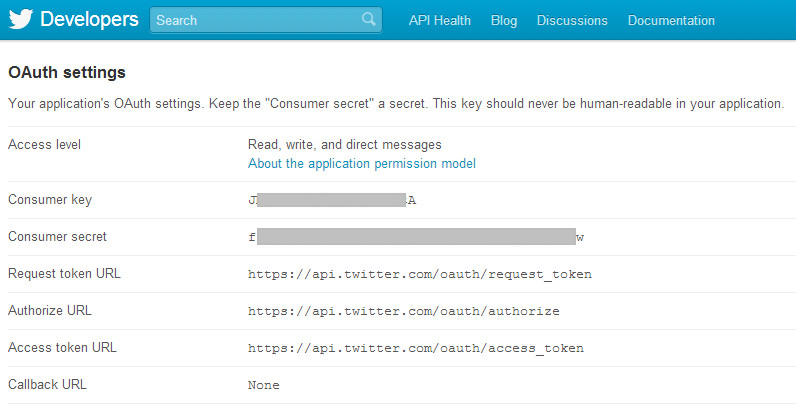
Register Twitter Develop Account.
  • Go to https://dev.twitter.com/apps/new and log in, if necessary
  • Supply the necessary required fields, accept the TOS, and solve the CAPTCHA.
  • Submit the form

  • Copy the consumer key (API key) and consumer secret from the screen into your application
consumer_key = ‘ConsumerKey######’
consumer_secret = ‘ConsumerSecret######

13 January, 2013

Install Zabbix on MK802 Lubuntu


Install Zabbix 2.02 from source on MK802 runing Lubuntu 12.06  (login root or su - )
Upgrade Lubuntu after install Lubuntu on MK802
#apt-get update
#apt-get upgrade
timezone and time from ntp.
#su -
#cd /etc
#cp /usr/share/zoneinfo/Asia/Bangkok /etc/localtime
#ntpdate clock.nectec.or.th
Install text editor(s), mailer, openssh server and wget
#apt-get install openssh-server openssh-client wget

07 January, 2013

Resize Partition MK802 Lubuntu

Resize Partition MK802 Lubuntu  by FDISK and RESITE2FS
Resize parttion ofMK802 Lubuntu 12.01 to 16 GB
1.  check porgram fdisk and resize2fs

root@miniand:~# ls -l /sbin/fdisk /sbin/resize2fs  
-rwxr-xr-x 1 root root 76796 Mar 30  2012 /sbin/fdisk
-rwxr-xr-x 1 root root 34708 Mar 31  2012 /sbin/resize2fs


03 January, 2013

Arduino on MK802 Lubuntu

Arduino 1.0 whit serial monitor on MK802 Lubuntu 12.04 LXDE 


1. Download install Arduino by apg-get
linaro@linaro-alip:~$ sudo apt-ger install arduino 
or root user 
root@linaro-alip:~# apt-get install arduino
Reading package lists... Done
Building dependency tree       Reading state information... DoneThe following extra packages will be installed:  arduino-core avr-libc avrdude binutils binutils-avr ca-certificates-java  default-jre default-jre-headless gcc gcc-4.6 gcc-avr java-common  libatk-wrapper-java libatk-wrapper-java-jni libftdi1 libgomp1 libjna-java  librxtx-java openjdk-6-jre openjdk-6-jre-headless openjdk-6-jre-lib tzdata  tzdata-java 

02 January, 2013

X11VNC on MK802 Lubuntu


   Install X11VNC on MK802 Lubuntu 12.04 whit auto logon. Can remote from PC to MK802 without mouse/keyboard/HDMI (need ip address)

1.Install X11VNC from user root
root@linaro-alip:~# sudo apt-get install x11vnc
root@linaro-alip:~# x11vnc -storepasswd
   Enter VNC password: <youpassword>
   Verify password: <youpassword>
   Write password to /root/.vnc/passwd? [y]/n y
   Password written to: /root/.vnc/passwd

MK802 Lubuntu 12.04


MK802 install Lubuntu 12.04 v4 (Ubuntu 12.04 using LXDE by miniand.com)
1. Download Ubuntu Image  from www.miniand.com-Install Ubuntu Linux 12.04  and extract 7z
lubuntu-desktop-12.04-4-720p-1GB-miniand.com.img.7z for MK802 1GB 720p
2. Download Program Image Writer for write the image to your SD card.
win32diskimager-binary.zip for windows